Secure connections
Save PostgreSQL connection details with encrypted passwords, SSL settings, URL import, testing, search, edit, and delete actions.
PostgreSQL desktop client
PgDeck is a native desktop application for PostgreSQL and nothing else. No browser tab, no local web server, no Java runtime, and no drivers for eighty engines you will never open — just the schema tree, the data grid, and the SQL editor, built for one database.
Short answer: PgDeck is a PostgreSQL desktop client for Windows, macOS, and Linux. It covers saved connections with keychain-encrypted passwords, schema and table browsing, type-aware filters, multi-tab SQL, ERD, SSH tunnels, bundled pg_dump backups, and exports — with row edits staged as one reviewable set and committed in a single transaction. It does not do server administration and connects to no other engine.
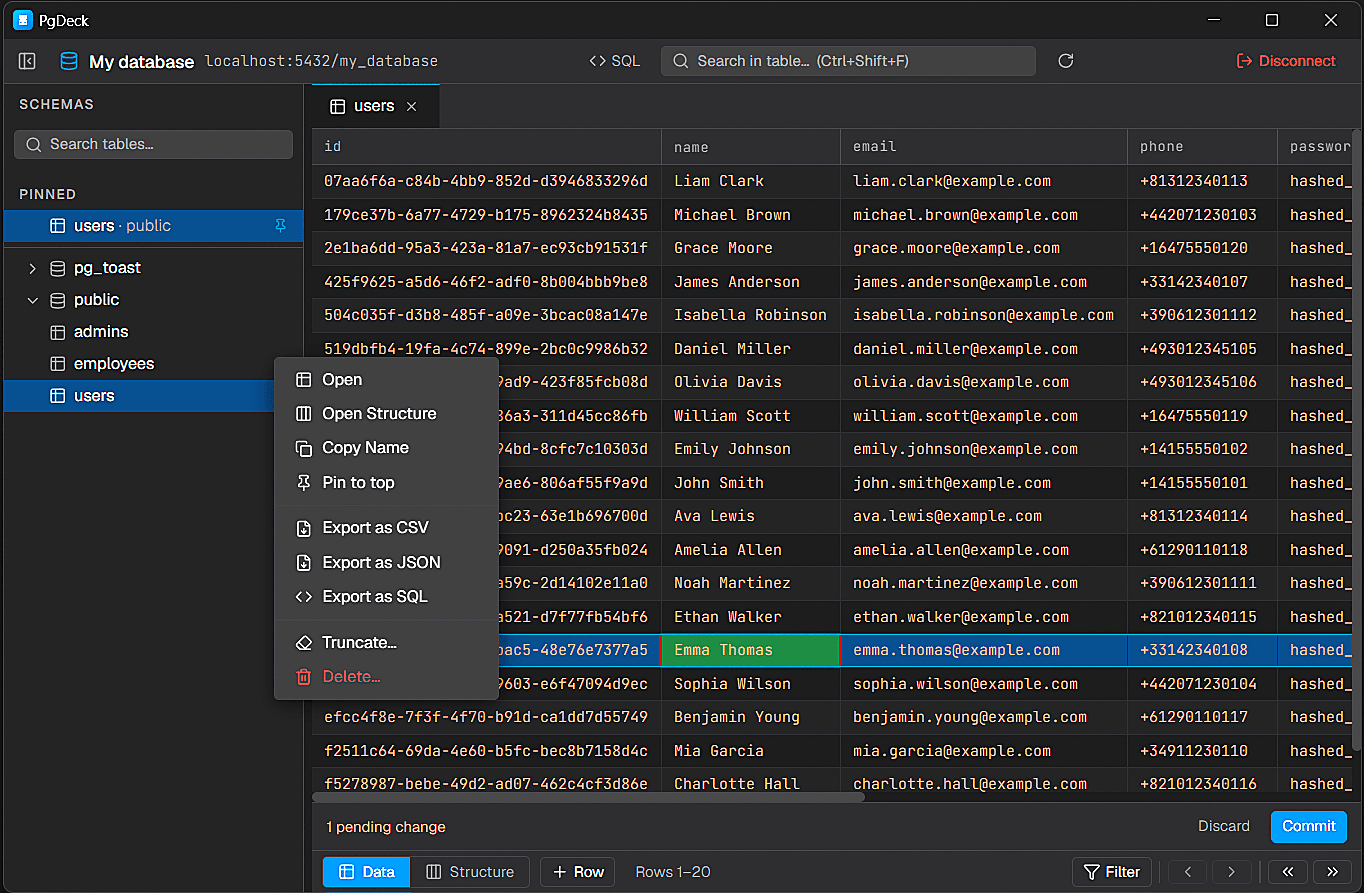
PgDeck is shaped around PostgreSQL tasks that happen every day: connect, inspect, filter, edit, query, manage structure, copy, and export.
| Free | Pro | |
|---|---|---|
| Saved connections | 2 | Unlimited |
| Schema and table browsing | Yes | Yes |
| Type-aware filters and sorting | Yes | Yes |
| SQL editor | Basic | Multi-tab |
| CSV and JSON export | Yes | Yes |
| Staged row editing with transaction commit | No | Yes |
| Quick Look editor for text and JSON | No | Yes |
| Structure management with SQL previews | No | Yes |
| Query history and saved queries | No | Yes |
| SSH tunnel connections | No | Yes |
| ERD relationship diagram | No | Yes |
| Backup and restore (pg_dump bundled) | No | Yes |
| Commercial use | No | Yes |
The free tier does not expire and is not a trial. A separate 30-day Pro trial is available with no card and no signup. Pro is $6/month, $59/year, or $99 once.
Save PostgreSQL connection details with encrypted passwords, SSL settings, URL import, testing, search, edit, and delete actions.
Browse schemas and tables, search the table list, pin favorites, filter rows, sort columns, resize columns, and paginate results.
Run SELECT and non-SELECT statements from multi-tab SQL editors with syntax highlighting and interactive query results.
Edit cells, add rows, duplicate rows, set NULL, stage deletes, review pending changes, and commit everything in one transaction.
A client covering many databases has to describe the union of all of them, so a filter offers generic operators and the column inspector shows generic types. PgDeck supports PostgreSQL only, so a boolean column offers true and false, a timestamptz opens a date input, search uses ILIKE, and a JSONB value opens in a real editor rather than a grid cell. That is the whole case for a single-engine tool, and it only matters if Postgres is the only engine you use.
Most data grids write a cell when you leave it. PgDeck holds every change — edits, inserts, duplicated rows, explicit NULLs, and deletes — as one pending set, shows it for review, and commits it in a single transaction. Either the whole correction lands or none of it does. On production data that review step is the difference between a caught typo and an incident.
Some work is genuinely a query. Multi-tab SQL runs SELECT and non-SELECT statements with syntax highlighting and interactive results, backed by query history and saved queries, in the same window as the table you were just looking at. Switching between clicking and typing costs nothing.
Save connections with host, port, database, user, and SSL mode, or paste a postgres:// URL and have every field filled in — which is how Supabase, Neon, AWS RDS, and Railway hand you their credentials. Passwords go into the operating system keychain rather than a plain-text config file, and SSH tunnels reach databases with no public route.
No roles and privileges editor, no tablespace management, no server configuration UI, no activity dashboard, and no connections to MySQL, SQLite, or anything else. If you administer a cluster, pgAdmin is the right tool and it is free. If you work across several engines, DBeaver or TablePlus will serve you better. Knowing what a tool is not is worth more than a longer feature list.
More on choosing, comparing, and running a PostgreSQL desktop client.
A native desktop client for PostgreSQL on Windows, macOS, and Linux. It covers saved connections, schema and table browsing, type-aware filters, staged row editing committed in one transaction, multi-tab SQL, structure management, ERD, backups, and exports to CSV, JSON, and SQL INSERT statements.
There is a free tier that does not expire: two saved connections, schema browsing, filters, a basic SQL editor, and CSV/JSON export. Pro adds staged editing, unlimited connections, SSH tunnels, ERD, backups, and commercial use, at $6/month, $59/year, or $99 once. A 30-day Pro trial is available with no card and no signup.
Yes. Connect with host, port, database, username, password, and SSL settings, or paste a postgres:// URL and every field is filled in for you. SSH tunnels reach databases with no public route, such as a private AWS RDS instance behind a bastion host.
Yes. Edit cells in the grid, insert rows, duplicate rows, set explicit NULL values, and mark rows for deletion. Every change is staged, shown for review as one set, and committed in a single transaction.
No. PgDeck connects to PostgreSQL only, and that is deliberate — it is what lets the interface use real Postgres types instead of generic ones. If you need several engines, DBeaver or TablePlus is the better choice.
In your operating system's keychain or credential store on your own machine, not in a plain-text configuration file and not on any server. PgDeck has no backend that sees your database credentials.
PgDeck is not affiliated with pgAdmin, DBeaver, TablePlus, DataGrip, Beekeeper Studio, or their respective owners. All product names, trademarks, and registered trademarks are property of their respective owners. Comparisons describe each tool as we understand it at the date noted on the table; if something here is out of date, tell us and we will correct it.