Secure connections
Save PostgreSQL connection details with encrypted passwords, SSL settings, URL import, testing, search, edit, and delete actions.
PostgreSQL GUI for Mac
PgDeck for macOS is a native desktop client for PostgreSQL and nothing else — a normal DMG, no Java runtime, no local web server. Connect to a local, staging, or hosted Postgres database and start reading tables in under a minute.
Short answer: PgDeck is a free-to-start PostgreSQL GUI for macOS, shipped as a DMG for Apple Silicon and Intel. The free tier covers two saved connections, schema browsing, type-aware filters, a basic SQL editor, and CSV/JSON export; staged row editing, SSH tunnels, ERD, and backups are Pro. Passwords go into the macOS Keychain, not a config file.
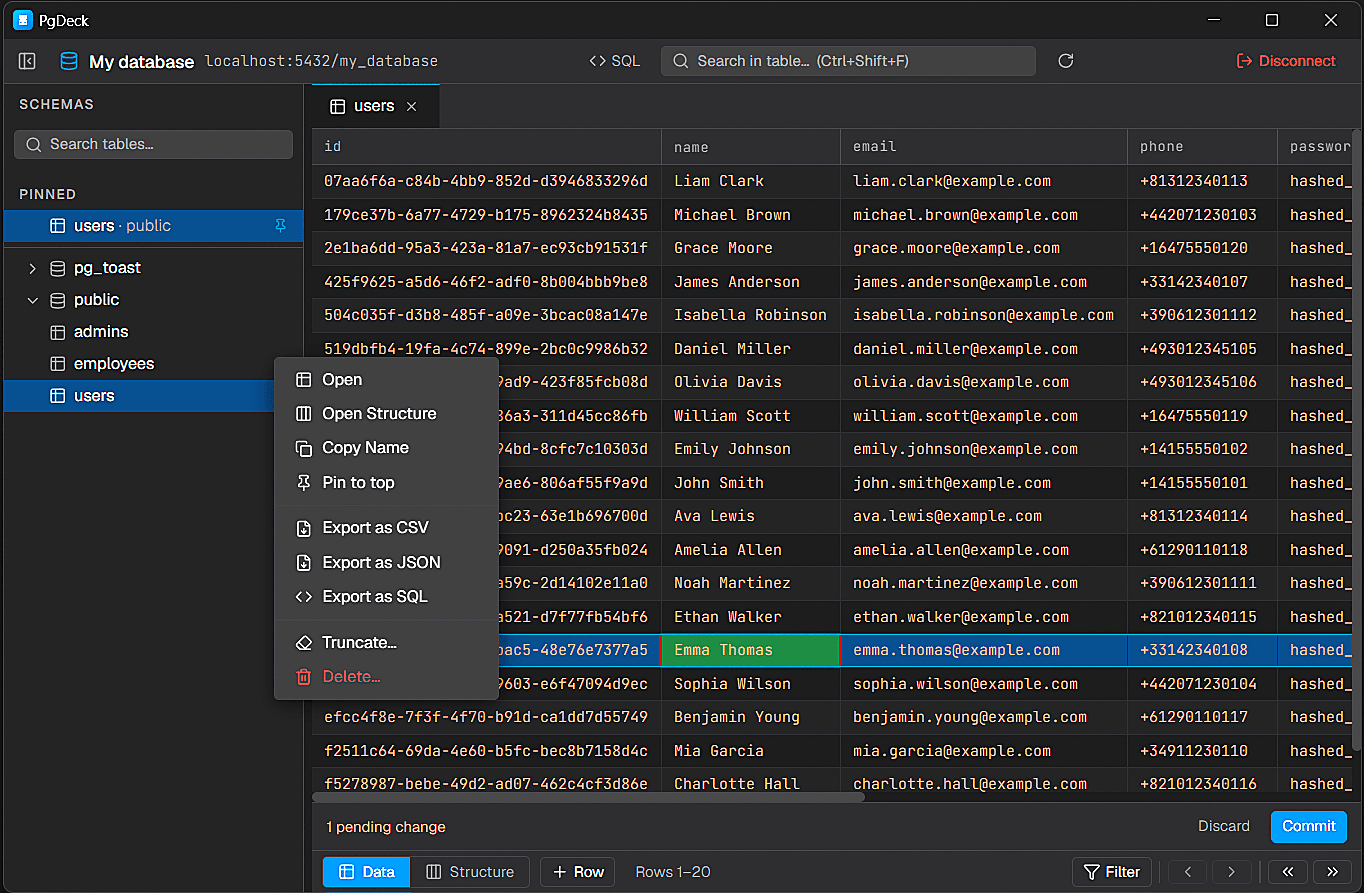
PgDeck is shaped around PostgreSQL tasks that happen every day: connect, inspect, filter, edit, query, manage structure, copy, and export.
Install the PgDeck desktop client and connect to local, staging, or hosted PostgreSQL databases.
Save PostgreSQL connection details with encrypted passwords, SSL settings, URL import, testing, search, edit, and delete actions.
Browse schemas and tables, search the table list, pin favorites, filter rows, sort columns, resize columns, and paginate results.
Run SELECT and non-SELECT statements from multi-tab SQL editors with syntax highlighting and interactive query results.
Edit cells, add rows, duplicate rows, set NULL, stage deletes, review pending changes, and commit everything in one transaction.
Download the disk image, open it, and drag PgDeck to Applications. The build covers both Apple Silicon and Intel machines. If macOS refuses to open it on first launch, right-click the app and choose Open rather than double-clicking — that is Gatekeeper's standard first-run prompt, not an error.
The two common macOS installs behave differently. Homebrew's postgresql formula creates a database and a role named after your macOS username, with no password, on port 5432. Postgres.app defaults to the same username with database postgres. If you are guessing a username, try your macOS short name before trying postgres.
# Homebrew: check it is running and see what exists
brew services list
psql -lFor a local database use localhost, port 5432, and the database and role from the step above. For a hosted database — Supabase, Neon, AWS RDS, Railway — paste the provider's postgres:// URL instead of typing fields, and every value including the SSL mode is filled in for you.
postgres://username:password@host.example.com:5432/dbname?sslmode=requireTest Connection reports the real error rather than failing quietly. Two causes account for most macOS failures: a hosted provider requiring SSL while sslmode is unset, and a local server that is not running because the Homebrew service was never started. Once it connects, the schema tree lists your tables. Passwords are stored in the macOS Keychain via Electron safeStorage.
PgDeck keeps your database tasks focused: connect, inspect schemas, filter rows, make staged edits, run SQL, and export results from one app.
Saved connection passwords are encrypted through Electron SafeStorage and the operating system secure storage instead of being stored as plain text.
Use the data grid for visual exploration and switch to SQL tabs when a task needs direct PostgreSQL statements.
More on choosing, comparing, and running a PostgreSQL desktop client.
Postico is the most Mac-native option and TablePlus the most polished multi-engine one, both paid. pgAdmin is free but runs in a browser. DBeaver is free and covers many engines but needs a Java runtime. PgDeck is a native PostgreSQL-only client with a free tier. Which is best depends on whether you need one engine or several.
Yes. pgAdmin and DBeaver Community Edition are free and open source on macOS, as is Beekeeper Studio Community Edition. PgDeck has a free tier covering two saved connections, schema browsing, filters, a basic SQL editor, and CSV/JSON export, plus a 30-day Pro trial with no card.
Yes. The macOS DMG covers both Apple Silicon and Intel machines.
Usually your macOS short username. Homebrew's postgresql formula creates a role and database named after the current user rather than postgres, which is the most common reason a local connection is rejected on a Mac. Run psql -l to see what actually exists.
Gatekeeper prompts on first launch for applications downloaded from the internet. Right-click the app in Applications and choose Open, then confirm. This is only needed once.
Yes. Connection passwords are encrypted through Electron safeStorage, which uses the macOS Keychain, rather than being written to a plain-text configuration file.