Secure connections
Save PostgreSQL connection details with encrypted passwords, SSL settings, URL import, testing, search, edit, and delete actions.
PostgreSQL GUI for Linux
PgDeck for Linux ships as a single AppImage. No repository to add, no package manager to fight, no Java runtime — make it executable and run it on any reasonably current desktop distribution.
Short answer: PgDeck is a free-to-start PostgreSQL GUI for Linux, distributed as an AppImage that runs without installation or root. The free tier covers two saved connections, schema browsing, type-aware filters, a basic SQL editor, and CSV/JSON export; staged row editing, SSH tunnels, ERD, and backups are Pro.
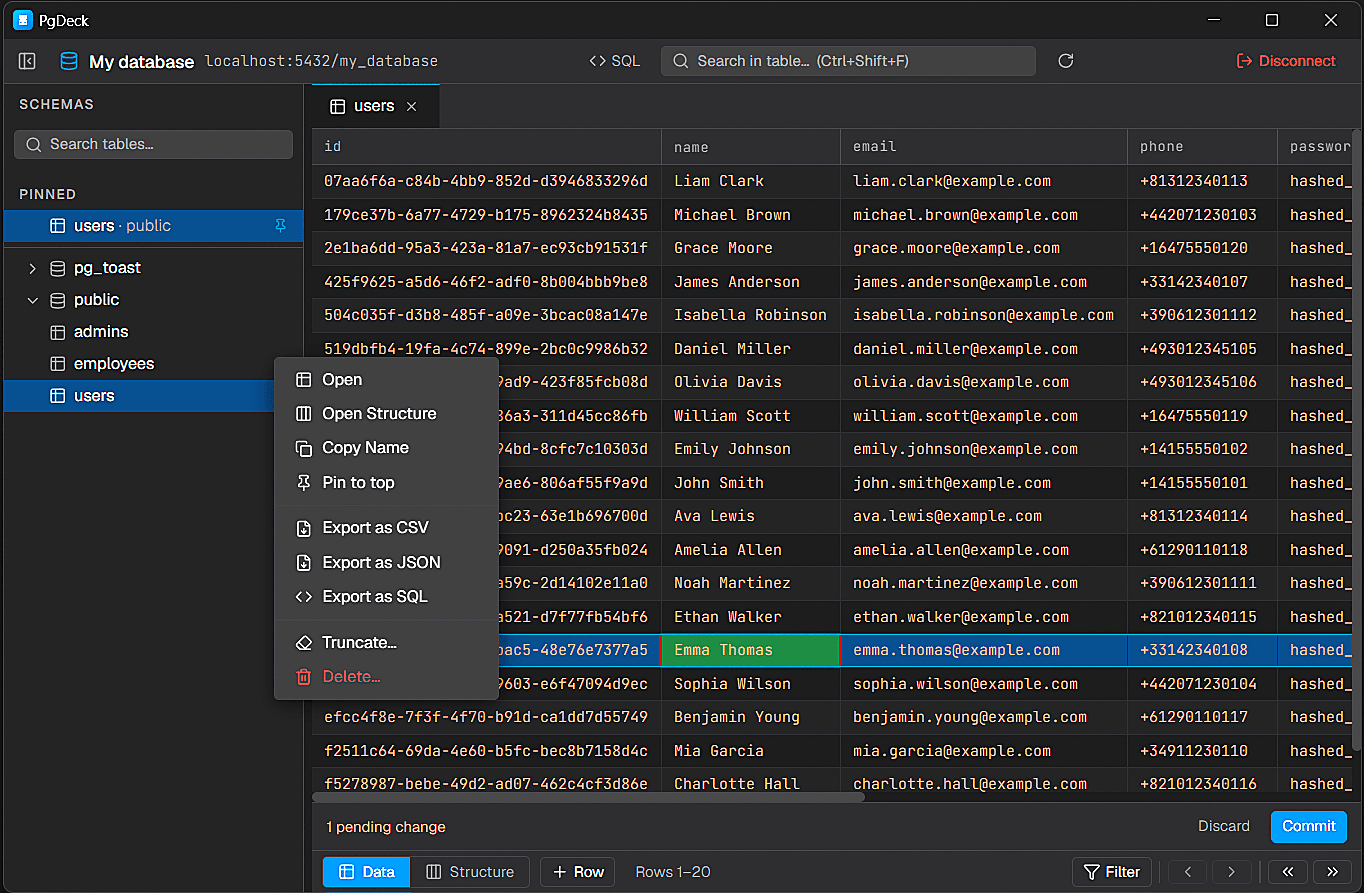
PgDeck is shaped around PostgreSQL tasks that happen every day: connect, inspect, filter, edit, query, manage structure, copy, and export.
Install the PgDeck desktop client and connect to local, staging, or hosted PostgreSQL databases.
Save PostgreSQL connection details with encrypted passwords, SSL settings, URL import, testing, search, edit, and delete actions.
Browse schemas and tables, search the table list, pin favorites, filter rows, sort columns, resize columns, and paginate results.
Run SELECT and non-SELECT statements from multi-tab SQL editors with syntax highlighting and interactive query results.
Edit cells, add rows, duplicate rows, set NULL, stage deletes, review pending changes, and commit everything in one transaction.
An AppImage is a single self-contained file. Downloaded files are not executable by default, so set the bit and run it — no root, no package manager, and nothing written outside your home directory.
chmod +x PgDeck-Linux-*.AppImage
./PgDeck-Linux-*.AppImageAppImages mount themselves using FUSE. Some distributions ship only FUSE 3 and the error is unhelpful. Either install the FUSE 2 compatibility package, or extract and run the contents directly, which avoids FUSE entirely.
# Debian / Ubuntu
sudo apt install libfuse2

# Or skip FUSE altogether
./PgDeck-Linux-*.AppImage --appimage-extract
./squashfs-root/AppRunA distribution-packaged PostgreSQL usually creates a postgres system user and accepts local connections over a Unix socket using peer authentication. A GUI client connects over TCP to localhost, which is a different path and uses md5 or scram authentication instead — so a password that psql never asked for is now required. Set one if you have not.
sudo -u postgres psql
\password postgresFor Supabase, Neon, AWS RDS, or any managed provider, paste the postgres:// URL rather than typing fields. Host, port, database, user, and the SSL mode are filled in together. Test the connection before saving so you see the real error if something is wrong.
Run PgDeck as a desktop client and keep common PostgreSQL tasks in a dedicated interface built for table inspection and safe editing.
Use PgDeck with local development databases, staging environments, or hosted PostgreSQL instances using host fields or connection URLs.
Copy selected rows as JSON or CSV, export the current page, or generate SQL INSERT statements from selected data.
More on choosing, comparing, and running a PostgreSQL desktop client.
pgAdmin is free, official, and best for administration, though it runs in a browser. DBeaver is free and covers many engines but needs a Java runtime. Beekeeper Studio is the simplest free option. PgDeck is a native PostgreSQL-only client shipped as an AppImage with a free tier.
Download it, make it executable with chmod +x, and run it directly. No installation, no root, and nothing written outside your home directory.
Almost always FUSE. AppImages mount themselves using FUSE 2, and several current distributions ship only FUSE 3. Install the compatibility package — libfuse2 on Debian and Ubuntu — or run the AppImage with --appimage-extract and launch squashfs-root/AppRun, which skips FUSE entirely.
psql connects over a Unix socket using peer authentication, which trusts your system user and never asks for a password. A GUI client connects over TCP to localhost, where pg_hba.conf requires scram or md5. Set a password for the role with \password inside psql, then use it in the client.
Yes. A multi-tab SQL editor with syntax highlighting, interactive results, query history, and saved queries, alongside the visual data grid.