Secure connections
Save PostgreSQL connection details with encrypted passwords, SSL settings, URL import, testing, search, edit, and delete actions.
PgDeck vs pgAdmin
Both tools are PostgreSQL-only, and that is where the similarity ends. pgAdmin is administration software that happens to show you table data. PgDeck is a data tool that happens to change structure. The table below is the honest version of the difference.
Short answer: Use pgAdmin if your job is administering the server: roles, tablespaces, configuration, and the activity dashboard are all things PgDeck does not do. Use PgDeck if your day is reading, filtering, and correcting table data, where a native desktop grid with staged edits is faster than pgAdmin's browser UI. Many teams run both.
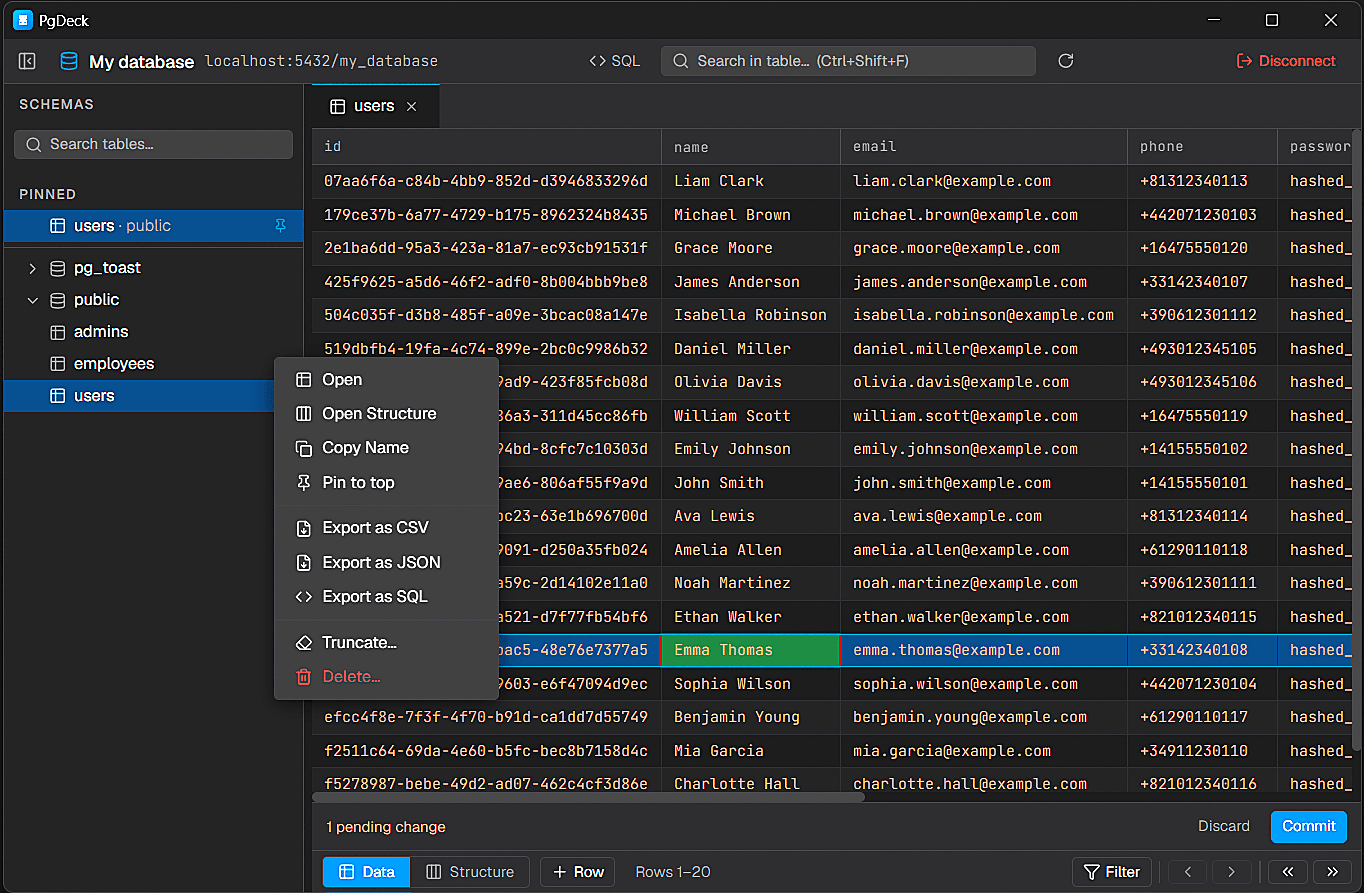
PgDeck is shaped around PostgreSQL tasks that happen every day: connect, inspect, filter, edit, query, manage structure, copy, and export.
PgDeck is an independent PostgreSQL desktop client. This page compares PgDeck with pgAdmin to help developers understand differences in workflow, interface, and product focus.
| PgDeck | pgAdmin 4 | |
|---|---|---|
| Databases supported | PostgreSQL only | PostgreSQL only |
| Runs as | Native desktop app | Web app in a browser |
| Price | Free tier, paid Pro | Free, open source |
| Edits staged and reviewed before commit | Yes | No |
| Multi-tab SQL editor | Yes | Yes |
| Query history and saved queries | Yes | Partial |
| ERD relationship diagram | Yes | Yes |
| Backup and restore (pg_dump / pg_restore) | Yes | Yes |
| SSH tunnel connections | Yes | Yes |
| Roles, tablespaces, server configuration | No | Yes |
| Server activity and session dashboard | No | Yes |
| Where credentials live | OS keychain, your machine | Server-side config |
Compared against pgAdmin 4 as of September 2026. pgAdmin is free and open source software maintained by the PostgreSQL community; PgDeck is not affiliated with the pgAdmin project.
Save PostgreSQL connection details with encrypted passwords, SSL settings, URL import, testing, search, edit, and delete actions.
Browse schemas and tables, search the table list, pin favorites, filter rows, sort columns, resize columns, and paginate results.
Run SELECT and non-SELECT statements from multi-tab SQL editors with syntax highlighting and interactive query results.
Edit cells, add rows, duplicate rows, set NULL, stage deletes, review pending changes, and commit everything in one transaction.
pgAdmin 4 is a web application. Even the desktop package is a bundled server plus a browser view, which is why panels reload, tabs multiply, and a large result set feels heavier than the query that produced it. PgDeck is a native desktop app with one window, so opening a table, filtering it, and moving to the next one has no page-load step in between.
Roles and privileges, tablespaces, server configuration, the activity and session dashboard, and the full backup UI are pgAdmin's territory. PgDeck does not implement server administration and is not trying to. If you are the person who manages the cluster rather than the person who queries it, pgAdmin is the correct tool and this comparison should not talk you out of it.
In pgAdmin's data grid you edit a cell and save the change. In PgDeck the edit is held as a pending change alongside every other insert, duplicate, NULL, and delete you have queued, shown as a reviewable set, and then committed in a single transaction. On production data that review step is the whole point: a mistyped cell is caught before it is an incident, and a set of related corrections either all land or none do.
pgAdmin is free and open source, permanently, with no tier above it. PgDeck has a free tier covering connections, schema browsing, filters, a basic SQL editor, and CSV/JSON export, with staged editing, unlimited saved connections, SSH tunnels, ERD, and backup behind a paid Pro plan and a 30-day trial that needs no card. If price is the deciding factor, pgAdmin wins and that is a reasonable way to decide.
More on choosing, comparing, and running a PostgreSQL desktop client.
pgAdmin 4 is a browser-based PostgreSQL administration tool covering roles, tablespaces, server configuration, and monitoring. PgDeck is a native desktop client focused on table data: browsing, type-aware filters, staged row editing committed in one transaction, multi-tab SQL, ERD, and exports. PgDeck does not do server administration.
For daily developer work — inspecting tables, correcting rows, running queries, exporting data — yes. For cluster administration, no. PgDeck has no roles editor, no tablespace management, no server configuration UI, and no activity dashboard. Teams commonly keep pgAdmin installed for those tasks.
pgAdmin is free and open source with no paid tier. PgDeck has a free tier with up to 2 saved connections, schema browsing, filters, a basic SQL editor, and CSV/JSON export, plus a 30-day Pro trial that requires no card. Pro is $6/month, $59/year, or $99 once.
For the loop of open a table, filter it, read a row, move on, a native desktop grid avoids the page-load and panel-reload steps that a browser UI has to perform. Raw query execution speed is PostgreSQL's job and is effectively the same in both tools.
Yes. They connect to the same database with the same credentials and neither installs anything into it. Running pgAdmin for administration and PgDeck for daily table work is a common setup.
PgDeck is not affiliated with pgAdmin, DBeaver, TablePlus, DataGrip, Beekeeper Studio, or their respective owners. All product names, trademarks, and registered trademarks are property of their respective owners. Comparisons describe each tool as we understand it at the date noted on the table; if something here is out of date, tell us and we will correct it.