Secure connections
Save PostgreSQL connection details with encrypted passwords, SSL settings, URL import, testing, search, edit, and delete actions.
DBeaver alternative
People leave DBeaver for two reasons: it is heavy, or they only ever open one database engine and are carrying eighty drivers to do it. If you leave for a third reason — you need something DBeaver does not do — you will probably come back, because very little is missing. This page is written by the PgDeck team, and says where each option including ours falls short.
Short answer: If PostgreSQL is your only engine, PgDeck is the lightest like-for-like swap and keeps staged editing, ERD, and backups. TablePlus is the closest multi-engine replacement. Beekeeper Studio is the simplest. pgAdmin is free and better at administration. Nothing here replaces DBeaver's cross-engine data transfer — if you use that, stay.
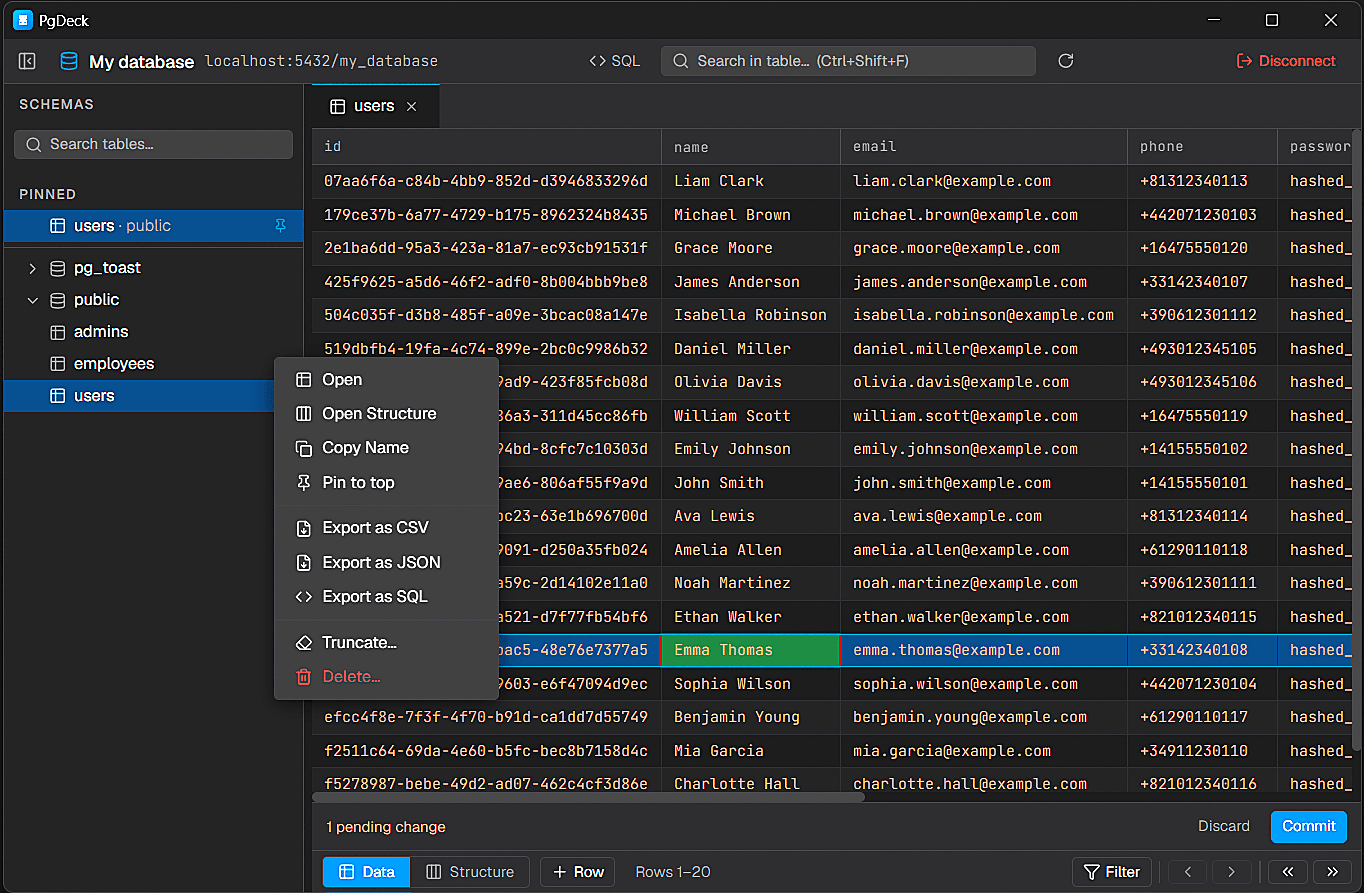
PgDeck is shaped around PostgreSQL tasks that happen every day: connect, inspect, filter, edit, query, manage structure, copy, and export.
Best for: Teams whose only database engine is PostgreSQL
Native desktop client with no Java runtime and one engine's worth of interface, so it starts fast and shows only Postgres concepts. Keeps the DBeaver features Postgres users actually use — multi-tab SQL, query history, ERD, pg_dump backup and restore, SSH tunnels — and adds staged edits committed as one reviewed transaction. Useless to you if you also open MySQL or Oracle.
Read the full comparisonBest for: Multi-engine users who want a native app instead of a Java one
The most direct swap if you need several engines but not the weight: native, fast, and well designed, covering PostgreSQL, MySQL, SQLite, Redis and more. Narrower than DBeaver on schema depth, has no ERD, and its unlicensed version limits open tabs, so a real evaluation means paying first.
Read the full comparisonBest for: Anyone who found DBeaver's interface overwhelming
Open source, multi-engine, and deliberately simple. If the complaint about DBeaver was density rather than speed, this is the clearest answer, and the free edition is genuinely usable. Shallower on schema introspection and administration, and it is an Electron app, so it is lighter to read than to run.
Best for: Postgres administration, at no cost, forever
If cost drove you to DBeaver Community Edition in the first place and PostgreSQL is your only engine, pgAdmin is free, official, and better at server administration than anything else on this page. It runs as a web application, which is the reason many developers pair it with a native client rather than using it all day.
Read the full comparisonPgDeck is an independent PostgreSQL desktop client. This page compares PgDeck with DBeaver to help developers understand differences in workflow, interface, and product focus.
| PgDeck | TablePlus | Beekeeper | DBeaver CE | |
|---|---|---|---|---|
| Requires a Java runtime | No | No | No | Yes |
| PostgreSQL-only interface | Yes | No | No | No |
| Free version you can work in | Yes | No | Yes | Yes |
| Staged edits reviewed before commit | Yes | Partial | Partial | Partial |
| ERD relationship diagram | Yes | No | No | Yes |
| Backup and restore built in | Yes | No | No | Yes |
| SSH tunnel connections | Yes | Yes | Yes | Yes |
| Cross-engine data transfer | No | No | No | Yes |
| Other database engines | No | Yes | Yes | Yes |
Assessed September 2026 against each tool's freely available edition. Vendors change features; if a row here is wrong, tell us and we will correct it.
Save PostgreSQL connection details with encrypted passwords, SSL settings, URL import, testing, search, edit, and delete actions.
Browse schemas and tables, search the table list, pin favorites, filter rows, sort columns, resize columns, and paginate results.
Run SELECT and non-SELECT statements from multi-tab SQL editors with syntax highlighting and interactive query results.
Edit cells, add rows, duplicate rows, set NULL, stage deletes, review pending changes, and commit everything in one transaction.
Before switching, list the DBeaver features you used in the last month. For most Postgres-only developers the list is: connection manager, schema tree, data grid with filters, SQL editor, export, and occasionally the ERD. Every tool on this page covers that. The features that are hard to replace are cross-engine data transfer, schema compare across engines, and the plugin ecosystem — if those are on your list, no alternative here is a real swap.
DBeaver runs on Java and the Eclipse platform because that architecture is what lets it host eighty drivers as plugins. You cannot configure that away. If start-up time and memory are the problem, the fix is a different architecture: a native single-engine app like PgDeck, or a native multi-engine one like TablePlus.
DBeaver's grid already holds changes locally and lets you save or revert, so this is a difference of degree. PgDeck makes the pending set the thing you look at: every queued insert, edit, duplicate, NULL, and delete listed together and committed in one transaction. For a multi-row correction on production data, reviewing one change set beats saving per grid.
Nothing in your database changes. These are all clients — they read your schema and run SQL, and none of them install anything into PostgreSQL. Switching means re-entering connection details once. Keep DBeaver installed for a fortnight rather than uninstalling on day one; the features you miss will show up quickly if there are any.
More on choosing, comparing, and running a PostgreSQL desktop client.
For PostgreSQL-only teams, PgDeck is the lightest swap that keeps SQL tabs, ERD, backups, and SSH tunnels. For multiple engines without the Java weight, TablePlus. For the simplest interface, Beekeeper Studio. For free Postgres administration, pgAdmin.
Yes. DBeaver's weight comes from running on Java and the Eclipse platform to support eighty-plus engines as plugins. Native clients — PgDeck for PostgreSQL only, TablePlus for several engines — do not carry a runtime or the unused drivers.
pgAdmin is free and open source for PostgreSQL. Beekeeper Studio has a free open-source Community Edition covering several engines. PgDeck has a free tier with two saved connections plus a 30-day Pro trial requiring no card.
Yes — a multi-tab SQL workspace with syntax highlighting, interactive results, query history, and saved queries, covering SELECT and non-SELECT statements.
No. Database clients read your schema and run SQL; they do not install anything into PostgreSQL. Switching means re-entering connection details, and you can run two clients side by side while you decide.
PgDeck is not affiliated with pgAdmin, DBeaver, TablePlus, DataGrip, Beekeeper Studio, or their respective owners. All product names, trademarks, and registered trademarks are property of their respective owners. Comparisons describe each tool as we understand it at the date noted on the table; if something here is out of date, tell us and we will correct it.