Secure connections
Save PostgreSQL connection details with encrypted passwords, SSL settings, URL import, testing, search, edit, and delete actions.
PostgreSQL GUI client
A GUI client replaces psql's prompt with a schema tree you can click and a grid you can read. PgDeck is one built for PostgreSQL alone, so filters, search, and the column inspector use real Postgres types rather than generic ones.
Short answer: A PostgreSQL GUI client connects over the same protocol as psql and shows your schemas, tables, and rows visually. PgDeck stores connections with keychain-encrypted passwords, imports postgres:// URLs in one paste, filters with type-aware operators, and stages row edits for review before committing them in a single transaction.
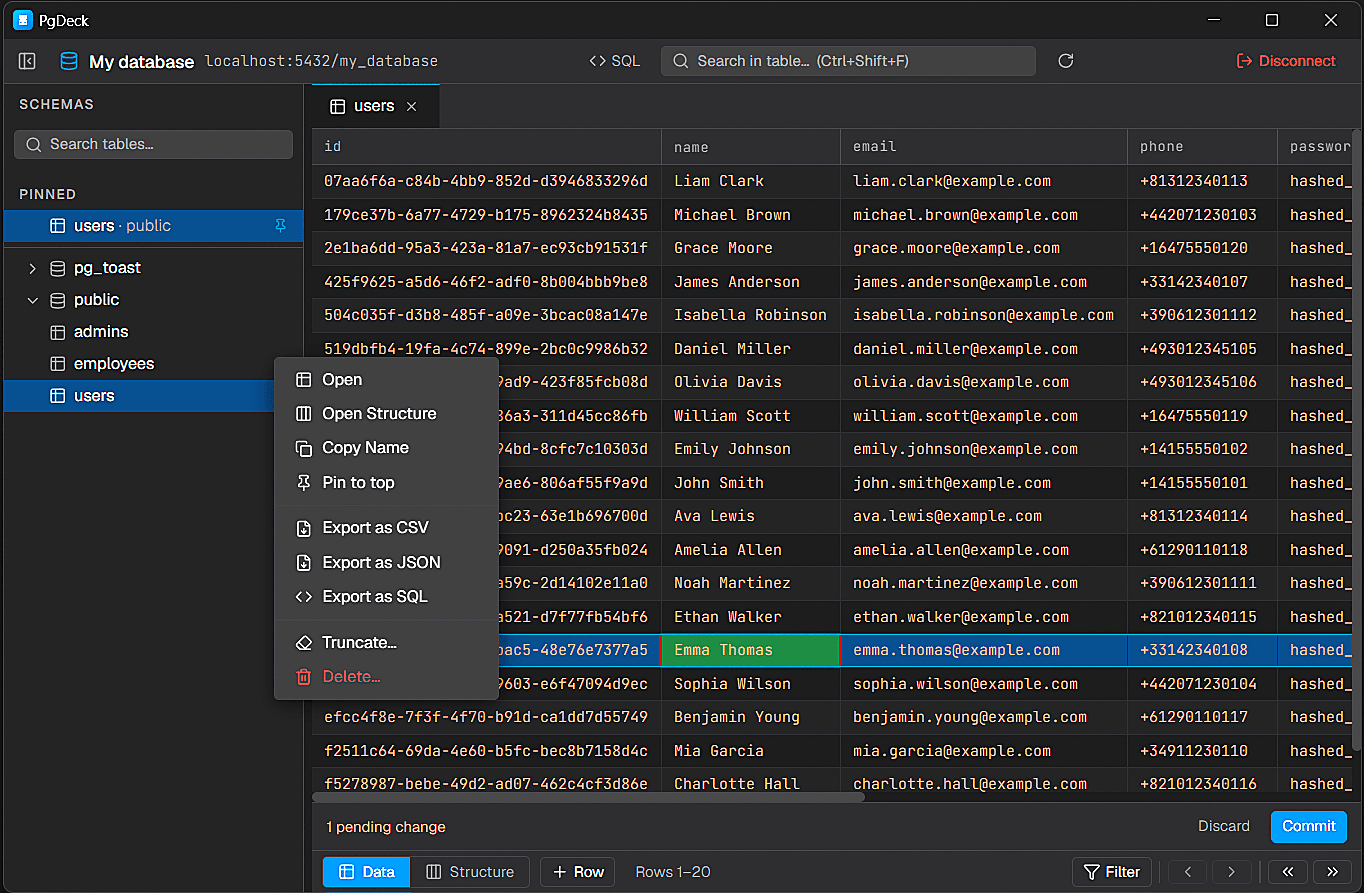
PgDeck is shaped around PostgreSQL tasks that happen every day: connect, inspect, filter, edit, query, manage structure, copy, and export.
Save PostgreSQL connection details with encrypted passwords, SSL settings, URL import, testing, search, edit, and delete actions.
Browse schemas and tables, search the table list, pin favorites, filter rows, sort columns, resize columns, and paginate results.
Run SELECT and non-SELECT statements from multi-tab SQL editors with syntax highlighting and interactive query results.
Edit cells, add rows, duplicate rows, set NULL, stage deletes, review pending changes, and commit everything in one transaction.
Every PostgreSQL client needs the same things: host, port, database name, username, and password. For a database on your own machine that is localhost, 5432, and the database and user created during setup. For a hosted database, all five come from the provider's dashboard.
Hosted providers hand you a single postgres:// connection string that packs all five values plus the SSL mode. Pasting it fills every field at once and avoids the usual transcription errors — a dropped username suffix, a mistyped region in the hostname, or a forgotten sslmode.
postgres://username:password@host.example.com:5432/dbname?sslmode=requireLocal databases usually accept unencrypted connections. Hosted ones generally refuse them, so sslmode must be require or stricter. If a connection fails against a cloud provider with a vague error, this is the first thing to check — and verify-full, which also validates the server's identity, needs the provider's CA certificate.
-- Check what the server is enforcing
SHOW ssl;
SELECT * FROM pg_stat_ssl WHERE pid = pg_backend_pid();Test the connection before saving so you see the real error rather than a silent failure. Once connected, the schema tree lists your schemas and tables — your own tables are normally in public — and clicking one opens its rows in the grid. Passwords are stored in the OS keychain, not a config file.
Explore schemas and tables, search the table list, pin favorites, resize the sidebar, and move between adjacent tables from the data grid footer.
Use the grid for edits and structure actions while keeping generated SQL previews and explicit confirmations where changes need extra care.
Filtering, sorting, pagination, copy workflows, and exports are optimized for the everyday loop of checking data, making a change, and moving on.
People search for a PostgreSQL IDE and a PostgreSQL GUI client meaning much the same thing: somewhere to browse a schema, run SQL, and change data without a terminal. PgDeck covers that loop with a multi-tab SQL editor, schema and index inspection, and structure editing. It is not a full database IDE in the DataGrip sense - there is no project system or code refactoring - and if you need those, a heavier tool is the honest answer.
More on choosing, comparing, and running a PostgreSQL desktop client.
A desktop or browser application that connects to PostgreSQL over the same protocol as psql, but shows schemas and tables as a clickable tree and rows as a grid. It replaces typing \dt and SELECT statements for routine inspection, while still letting you write SQL when that is faster.
Usually yes, occasionally. psql is the right tool for scripting, running migration files, working over SSH on a server, and anything you want in a shell pipeline. A GUI client is the right tool for reading data, exploring an unfamiliar schema, and making small corrections. They are complements.
In order of likelihood: SSL is required by the server but not set in the client, a firewall is blocking outbound port 5432, the host is unreachable because the database has no public route, or the username or database name is wrong. Use the client's test-connection action so you see the real error instead of a silent failure.
Yes. PgDeck includes a multi-tab SQL editor with syntax highlighting, interactive results, query history, and saved queries, sitting in the same window as the data grid.
Yes. Copy rows as JSON or CSV, export a filtered view to CSV, and generate SQL INSERT statements from selected data.
It covers what most people want from a PostgreSQL IDE - a multi-tab SQL editor, schema and index inspection, structure editing, and a data grid - in a desktop app built only for Postgres. It is not a full IDE with a project system or refactoring tools; if you need those, DataGrip is the better fit.