Secure connections
Save PostgreSQL connection details with encrypted passwords, SSL settings, URL import, testing, search, edit, and delete actions.
PostgreSQL GUI for Windows
PgDeck for Windows is a native PostgreSQL desktop client: a normal .exe installer, no Java runtime, no browser tab, no local web server. Connect to a local, staged, or hosted Postgres database and start reading tables in under a minute.
Short answer: PgDeck is a free-to-start PostgreSQL GUI for Windows 10 and 11, installed from a standard .exe. It covers saved connections with keychain-encrypted passwords, schema and table browsing, type-aware filters, a multi-tab SQL editor, and CSV/JSON export on the free tier, with staged row editing, SSH tunnels, ERD, and backups on Pro.
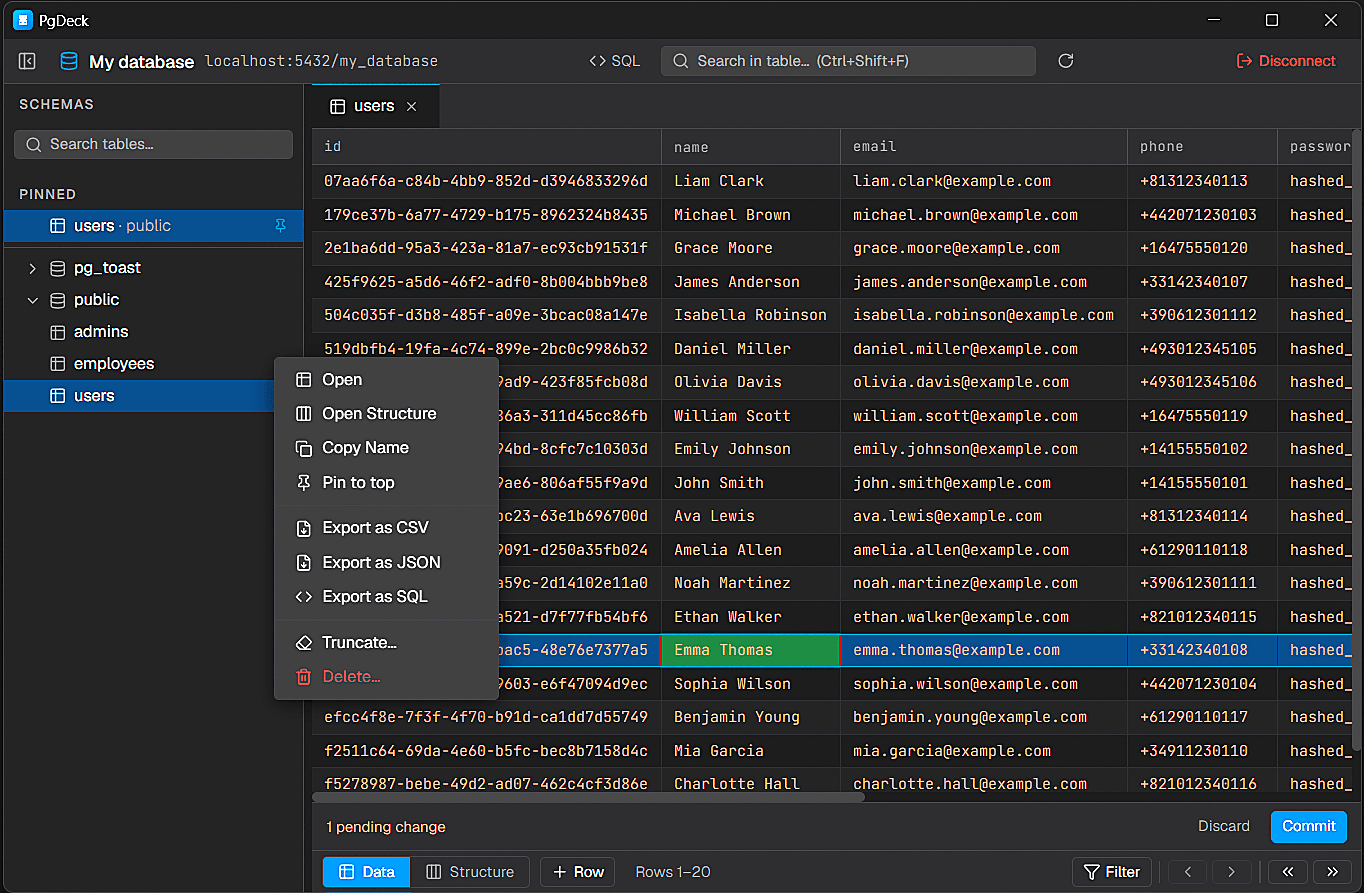
PgDeck is shaped around PostgreSQL tasks that happen every day: connect, inspect, filter, edit, query, manage structure, copy, and export.
Install the PgDeck desktop client and connect to local, staging, or hosted PostgreSQL databases.
Save PostgreSQL connection details with encrypted passwords, SSL settings, URL import, testing, search, edit, and delete actions.
Browse schemas and tables, search the table list, pin favorites, filter rows, sort columns, resize columns, and paginate results.
Run SELECT and non-SELECT statements from multi-tab SQL editors with syntax highlighting and interactive query results.
Edit cells, add rows, duplicate rows, set NULL, stage deletes, review pending changes, and commit everything in one transaction.
Download the Windows installer and run it. It is a standard signed .exe — there is no Java runtime to install first and no local web server to start, which is the main practical difference from running pgAdmin on Windows.
Choose New Connection and fill in host, port, database, user, and password. For a database on the same machine the defaults are localhost and port 5432, with the database and user you created during PostgreSQL setup. Passwords are stored in the Windows credential store, not in a plain-text config file.
If your database is hosted — Supabase, Neon, AWS RDS, Railway — the provider gives you a postgres:// URL. Paste it and PgDeck fills in every field including the SSL mode, so there is nothing to transcribe by hand.
postgres://username:password@host.example.com:5432/dbname?sslmode=requireUse Test Connection before saving — it reports the actual error rather than failing silently, which catches the two usual Windows problems: a firewall blocking outbound 5432, or a hosted provider requiring SSL when sslmode is unset. Once it connects, the schema tree lists your tables and clicking one opens its rows.
Install PgDeck on Windows and keep your PostgreSQL browsing, editing, SQL, and export work in a dedicated desktop client.
Create saved connections with host, port, database, user, password, SSL settings, or paste a postgres:// URL to populate fields quickly.
PgDeck stages edits before commit, helping you review row changes and apply them intentionally in a single transaction.
Searching for a Postgres IDE for Windows usually means wanting SQL tabs, schema browsing, and structure editing in one window - not a Java IDE that takes a minute to start. PgDeck ships as a normal Windows installer, opens quickly, and keeps the SQL editor next to the data grid so you can switch between typing a query and editing a row.
More on choosing, comparing, and running a PostgreSQL desktop client.
pgAdmin is free and best for server administration, but runs in a browser. DBeaver is free and covers many engines, at the cost of a Java runtime. PgDeck is a native Windows app for PostgreSQL only, with staged row editing and a free tier. Which is best depends on whether you administer the server or read its data.
Yes. pgAdmin and DBeaver Community Edition are both free and open source on Windows. PgDeck has a free tier covering two saved connections, schema browsing, filters, a basic SQL editor, and CSV/JSON export, plus a 30-day Pro trial that needs no card.
Yes. PgDeck ships a standard signed Windows installer that runs on Windows 10 and Windows 11. There is no Java runtime prerequisite and no local web server component.
Yes — Supabase, Neon, AWS RDS, Railway, or any reachable server. Paste the provider's postgres:// URL and PgDeck fills in the host, port, database, user, and SSL mode for you.
Two causes account for most cases. Outbound port 5432 blocked by Windows Defender Firewall or a corporate network, and a hosted provider that requires SSL while sslmode is unset. Use Test Connection — it reports the underlying error rather than failing silently.
Several, and they trade weight against depth. DataGrip and DBeaver are full IDEs with the start-up time to match. PgDeck is lighter: a Windows desktop app for PostgreSQL with a multi-tab SQL editor, schema and index inspection, structure editing, and staged row edits.